Product update
November 2026: more ways to pay, clearer ways to track.
This month gives your firm more control over how and when payments go out, a clearer view of what has been paid and what is still outstanding, easier contact management, and new protections for sensitive workflows.
- 01Disbo prints and sends checks for you
- 02Check Aging Summary and upgraded Payments tab
- 03Multiple addresses and payment history per contact
- 04Recipient privacy and login protections
Checks go out without the check-printing workload.
Your firm can now send checks through Disbo. We print and send them on your behalf, while your team keeps visibility into the payment process.
- Pay case costs from your operating account.
- Reissue a check within a 90-day window.
- Pay the same recipient more than once on a case.
- Begin a payout before the full settlement has been allocated.
- See more check details in the recipient details panel.
Whether a payment goes out by check or ACH, your team manages it through one connected workflow.
See what is paid, and what is still outstanding.
New reporting and case-management tools make it easier to understand what has been paid, what is still outstanding, and what needs attention.
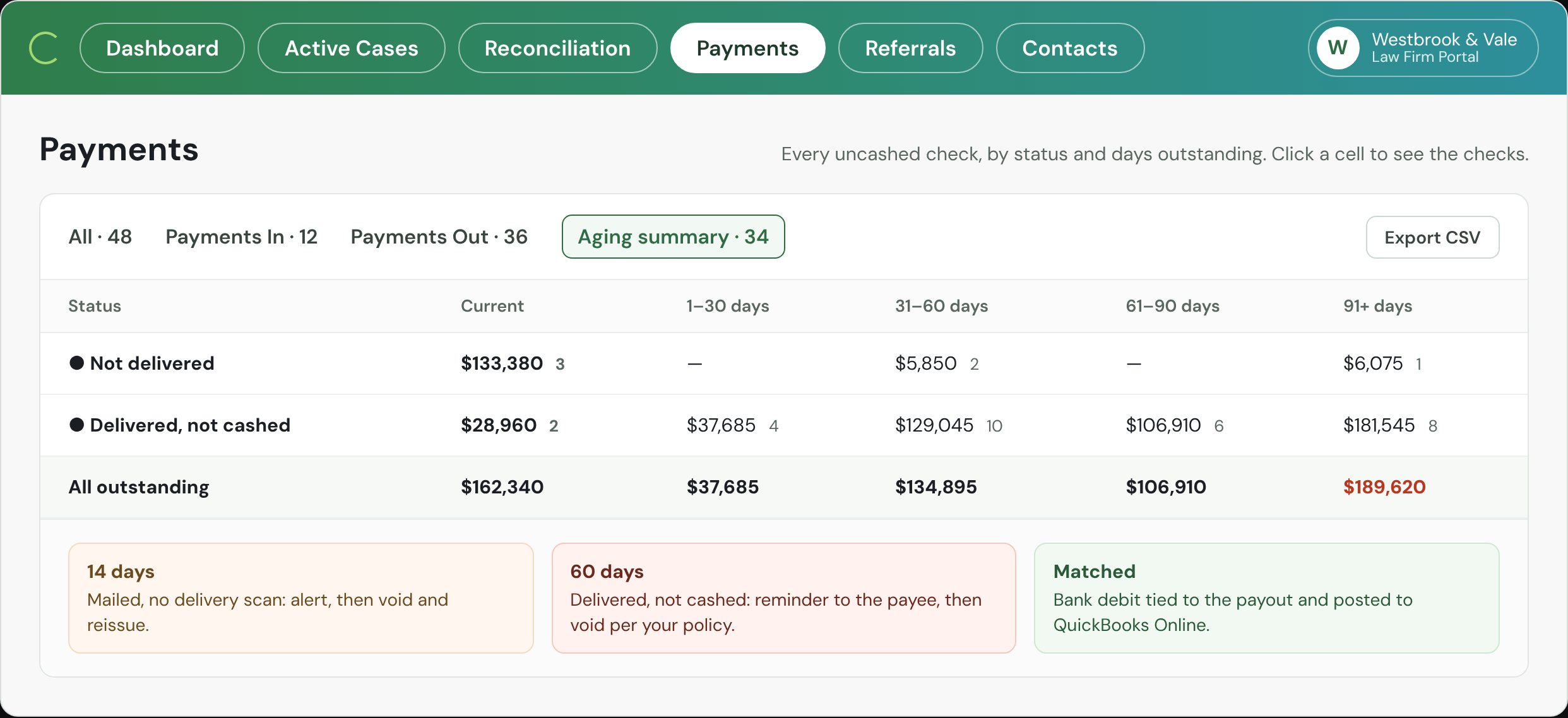
- Check Aging SummaryLive shows outstanding checks and disbursed funds.
- Upgraded Payments tabLive makes payment activity easier to review.
- Outstanding
- Checks issued but not yet cashed, grouped by status and days outstanding.
- Disbursed
- Funds that have been paid out, so you can compare against what is still open.
Also across your cases
- Up to 24 months of bank transactions.
- Link settlement deposits earlier in the case workflow.
- A contact's payment history from the Contact panel.
- Easier invitations and reminders for recipients.
One contact, one complete record.
Contacts can now have multiple addresses. Choose a default address and add an optional nickname or label to each one.
Together with payment history, expanded check details and multiple payments to the same recipient, your team sees each contact in one place instead of piecing it together across records.
More protection for sensitive workflows.
- Recipient privacy protections.
- Additional login safeguards.
Both strengthen access controls and help support your firm's compliance processes.
Start using what is new.
Our implementation team will set it up with you.
Get help starting with the new payment, reporting and case-management features.
Contact the implementation teamSee checks and ACH run from one case.
Send payments by check or ACH, track payment activity, and keep every disbursement connected to its case.
Talk to sales