Checks a day
One PI firm sends about a hundred checks a day through Disbo. Nobody at the firm prints, stuffs or stamps one.
High-volume PI firmStaff prepare. Your signer approves. Payments leave your own IOLTA by check or electronic payment and reconcile in your books.
→Book a Free DemoSee how a demo goes →




 + more
 Send + reconcile + automate


 xero+ more
One settlement, seven payees. By hand, and in Disbo.
Seven payees. Four people. A spreadsheet at month-end.
One operator queues it. One signer approves it. Nothing is typed twice.
Eight things your disbursement team does by hand today. Each one is a card. Open any of them to see the screen your team would use.
Who holds the funds, who releases a payment, and what the audit log records.
Yes, with every document. Each check is printed and mailed for you, drawn on your own IOLTA with your check number and your firm on the envelope. The lien letter, the signed statement, and anything else you attach go in the same envelope. You see it mailed, delivered, and cashed.
No one. Most payouts are checks, drawn on your IOLTA and cleared by your bank like any check you write today. The rest are electronic payments that pass through our banking partner instantly and never sit anywhere or earn interest. Disbo holds nothing; it is software, like your bank's bill pay.
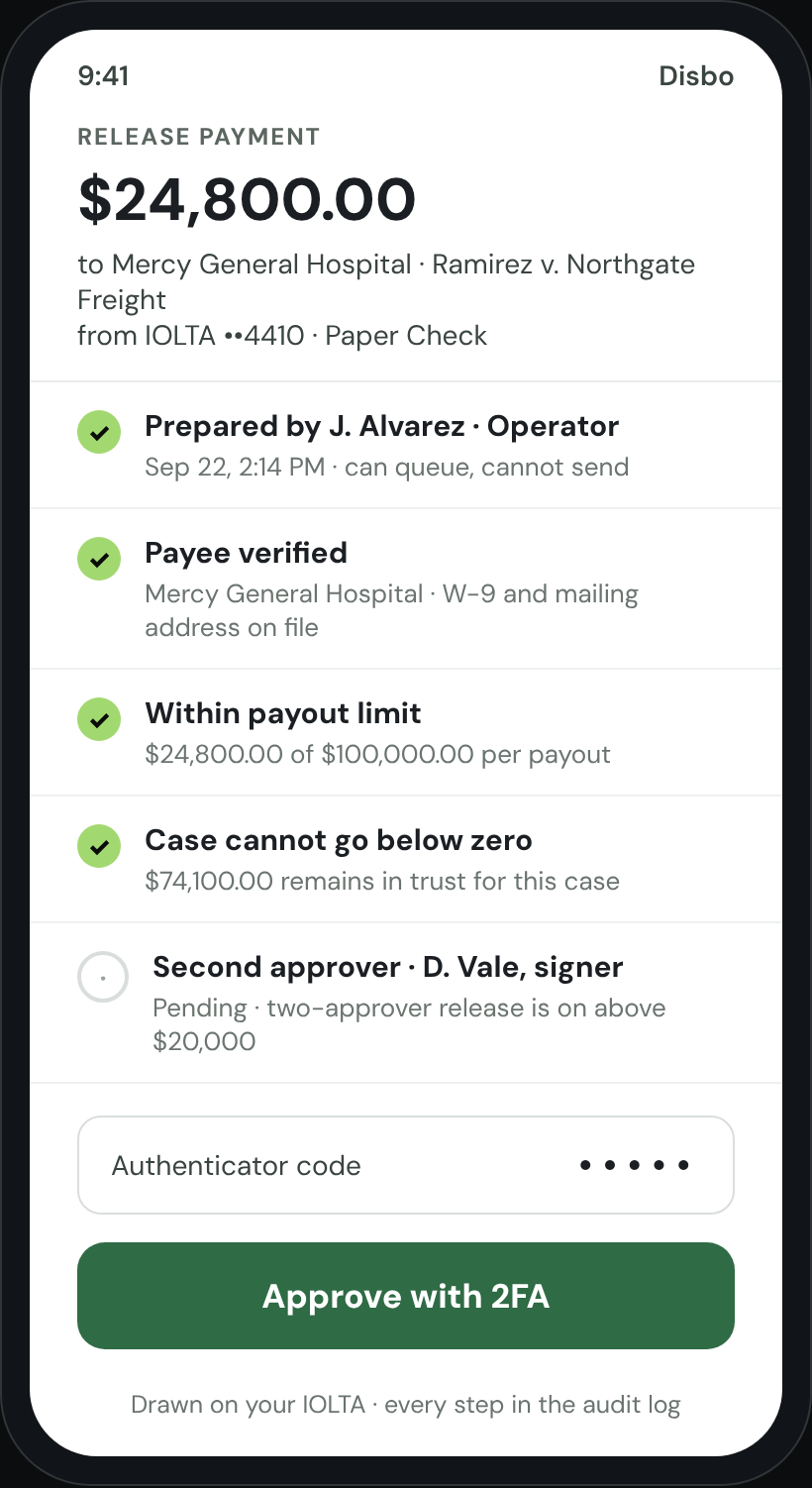
Staff prepare payouts. Only a registered admin or an authorized signer can release them, from a phone, with two-factor on every send. You can require a second approver above any amount you choose.
The flow of funds has been reviewed with the California State Bar, other state bars, Ellen Pansky's office, and IOLTA.org. Fees come only from operating. Every payout is tied to a case and a payee. Disbo charges nothing to your clients and has no law firm investors.
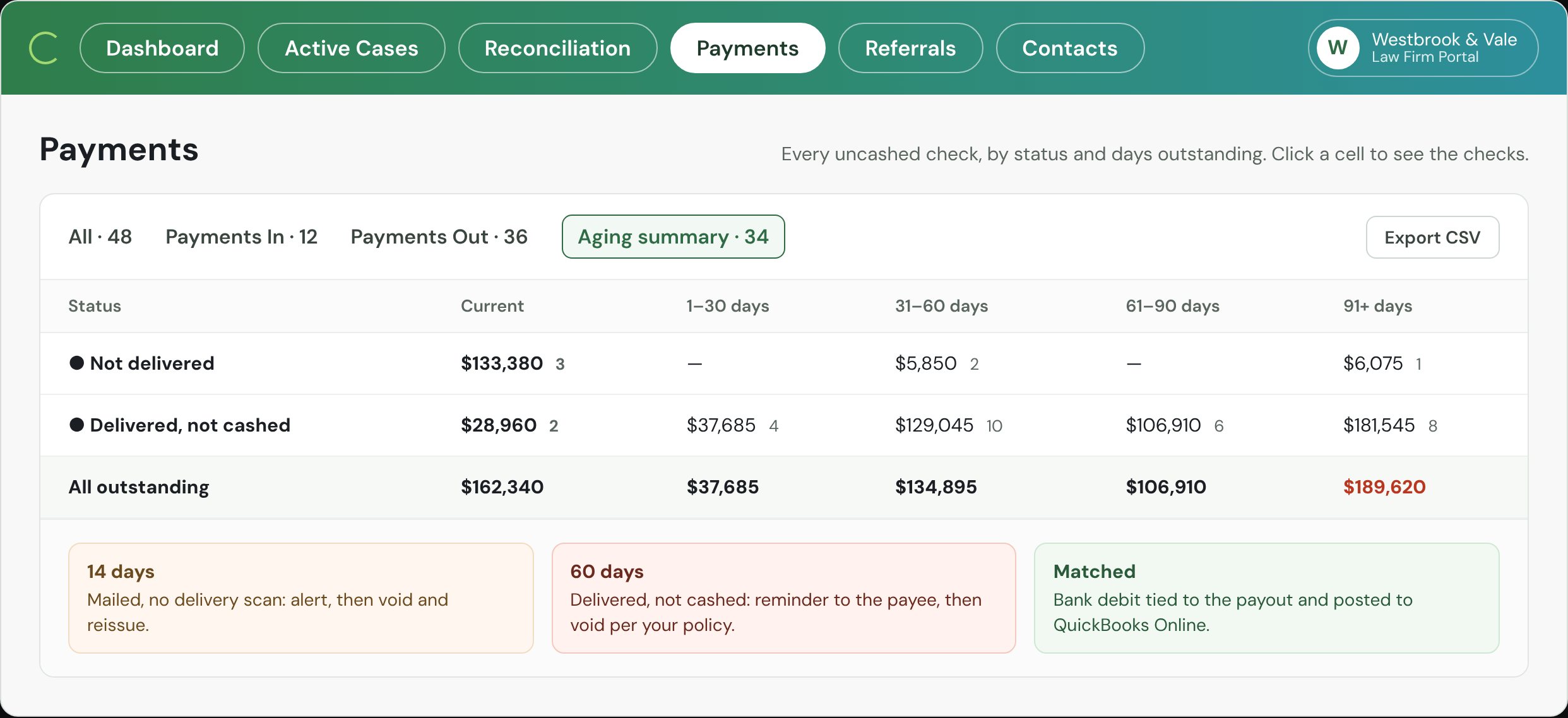
One log per payment: who prepared it, who approved it, and when it was sent, delivered, and cashed. Uncashed checks are aged by days outstanding. Every open case shows its settlement, what is still in trust, and who has been paid, so nothing lives in a side spreadsheet.
Because every deposit, payout, and case cost posts as it happens, month-end is a review, not a rebuild. Disbo prepares the adjusted bank balance, the trust journal, and the client ledgers side by side, itemizes any difference, and exports the report for your accountant and the bar. In beta.
Privileged firm documents are accessible only to a two-person, US-based support team under NDA. Payees link their own bank through Plaid with a government ID on file, so routing and account numbers never live in Disbo and an emailed bank change can't change anything.
Hands-on time to pay out one seven-payee settlement, from signed statement to every payee paid.
Your bank holds the funds. Your case-management system holds the matter. Your accounting system holds the books. Disbo is the payment and ledger layer between them.
XeroAll live today. Cases and settlement documents come in from your case-management system; status, cleared date, and the check image go back to the case. Deposits, payouts, and case costs post to your accounting system tagged to the case.
Five steps, in the order we walk through on a call.
When the settlement hits your IOLTA, Disbo matches it to the case and shows what is settled, what is still in trust, and who has been paid.
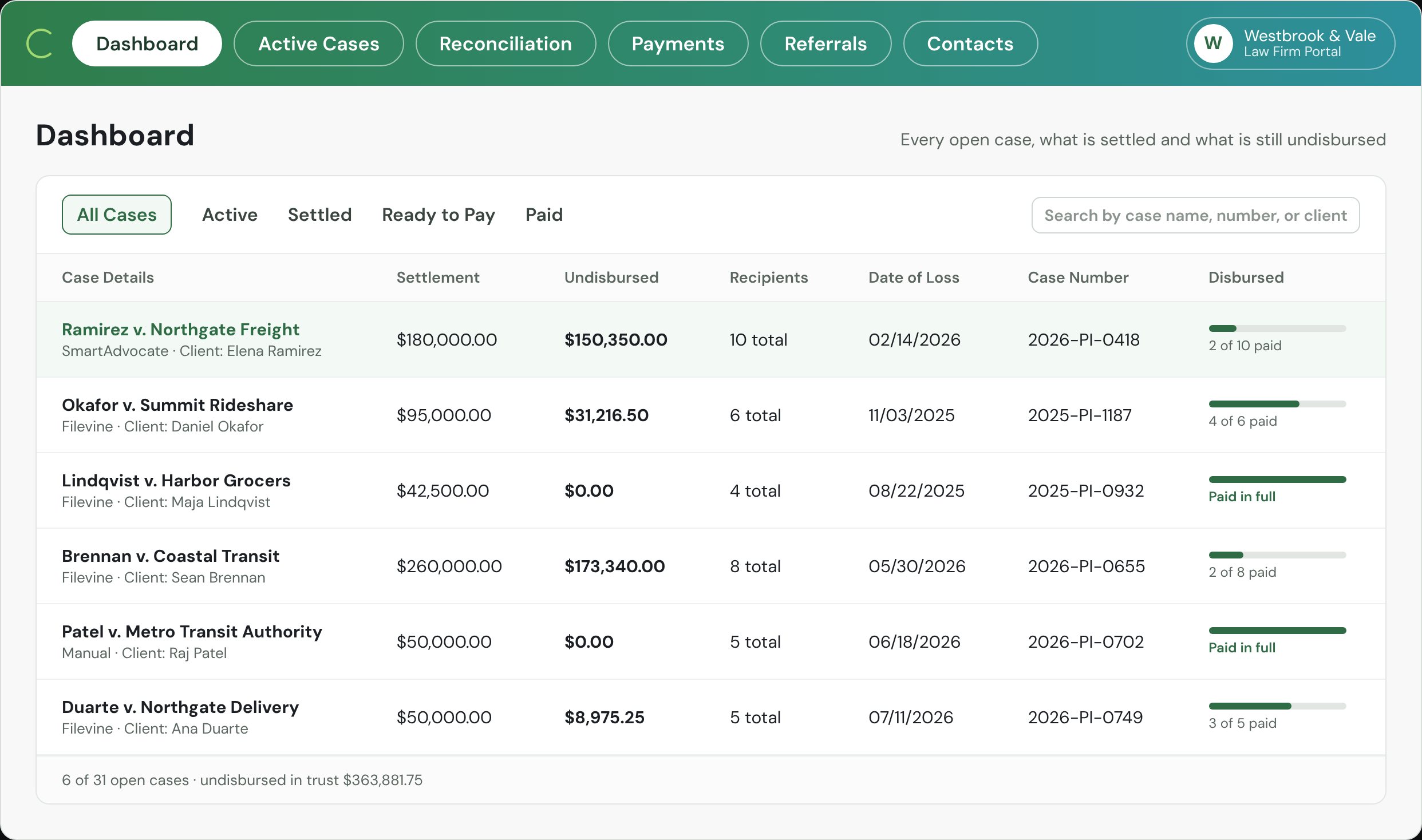
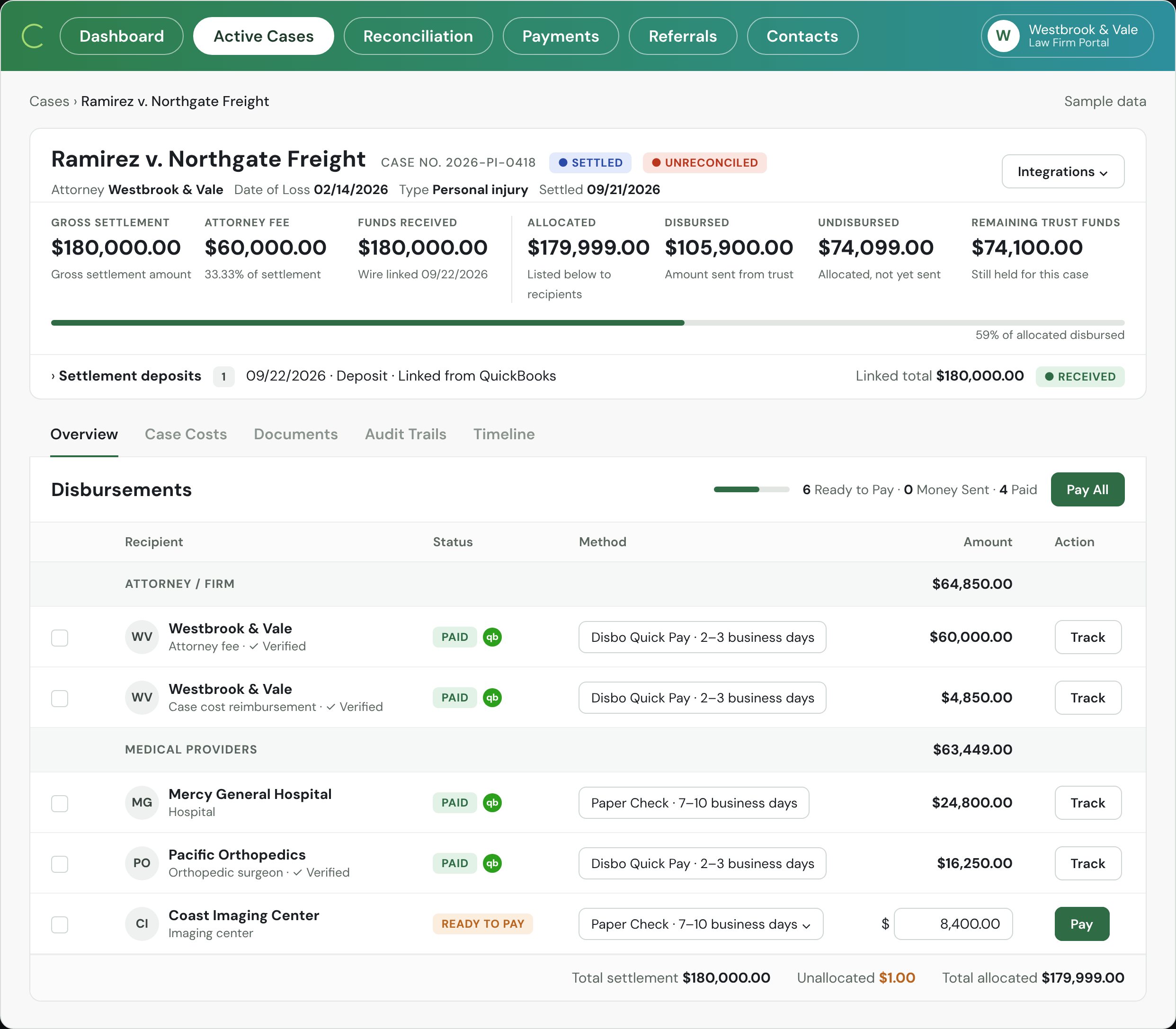
The signed statement comes in from your case system. Every payee is queued, and Pay stays off until it balances to the penny.
Only your signer can release it, from a phone, with a two-factor code.
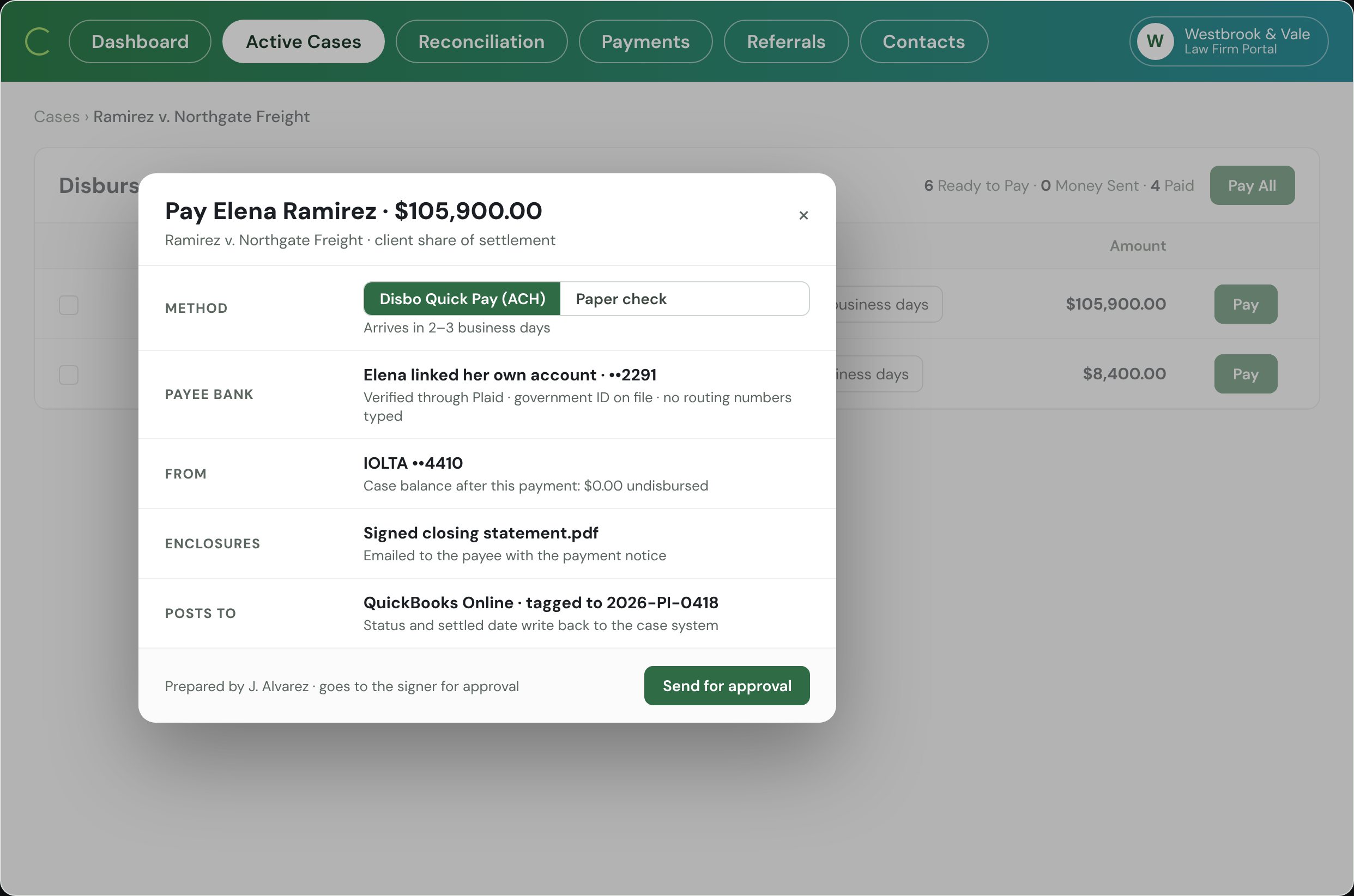
Direct deposit to the bank the payee linked, or a check printed and mailed for you with the letter enclosed.
Every payment shows sent, delivered, and cashed. "Where's my check?" is one click.
One PI firm sends about a hundred checks a day through Disbo. Nobody at the firm prints, stuffs or stamps one.
High-volume PI firmSigned statement to every payee paid. One operator prepares, one signer releases, and the books are posted when the last payment leaves.
PI firm, previously by handMoney one firm didn't know was still sitting in its IOLTA until Disbo laid every case balance and every uncashed check side by side.
PI firm, first reconciliation on DisboWhen the bar asked, the firm pulled the per-payment trail and the month-end workbook from Disbo instead of rebuilding a year from bank statements.
PI firm under state bar auditPayment methods, signer roles, connections and monthly reconciliation (Beta).
No. The money stays in your IOLTA at your bank until your signer releases each payment. Checks are drawn on your IOLTA. Electronic payments pass through our banking partner, Cross River Bank, instantly; they never sit anywhere and never earn interest. Disbo is software, like your bank's bill pay, and it never decides to release a dollar.
Staff prepare payouts. Only a registered admin or an authorized signer can release them, from a phone, with two-factor on every send. You can require a second approver above any amount you choose. Every step is in the audit log.
The flow of funds has been reviewed with the California State Bar, other state bars, Ellen Pansky's office, and IOLTA.org. Fees come only from operating, every payout is tied to a case and a payee, and the firm keeps prepare and send as separate roles. Disbo charges nothing to your clients and has no law firm investors.
No. Filevine, Clio, CASEpeer, Litify, Neos and SmartAdvocate are live connections: cases and settlement documents come in, and status, cleared date and the check image go back to the case. QuickBooks Online, Sage, NetSuite and Xero are live too: deposits, payouts and case costs post tagged to the case. Anything else comes in from a spreadsheet during onboarding.
Electronic payment to a bank the payee links themselves through Plaid, with a government ID on file, or a printed check mailed for you with the lien letter and signed statement enclosed. The lienholder gets an email when it goes out, and you see sent, delivered and cashed on every check.
Priced per payout. Under 100 payouts a month there is no platform fee: $4.97 a payout, check or ACH, one rate. Plans from $49 a month add integrations and bring the per-payout rate down to $3.95 at scale. Nothing is charged until your first payment goes out. By hand, a check costs a firm about $28 in staff time, printing, postage and follow-up. See pricing →
An implementation lead on our team sets you up: bank connection, signers and roles, your case-management and accounting connections, and your historical trust balances. The import is part of setup, not a paid add-on.
It is in beta. Each month Disbo prepares the adjusted bank balance, the trust journal and the client ledgers side by side, itemizes any difference for your review, and exports the report. Your accountant signs off; Disbo does the assembling.
Payees link banks through Plaid tokens, so routing and account numbers never live in Disbo. The firm's privileged documents are accessible only to a two-person, US-based support team under NDA. Disbo carries $1M in cyber and e-crime coverage.
In your case-management system, the way you do it today, for example Filevine's settlement tab with Vinesign. Disbo picks up the signed document, queues the payees from it, and sends it along with the payment.
A settlement in, every payee paid, the books reconciled. Press play.
Thirty minutes. We'll run a disbursement end to end on your own case numbers and show you what month-end looks like after.
Book a Demo →